


Physicists like to do things from first principles. When I was incorporating my business back in 2024, rather than use a registration service like a normal person, I did it the long and painful way directly with the CRA because I wanted to understand the process. When I got fed up with Quickbooks not having the features I wanted, I taught myself double-entry accounting and built my own bookkeeping system in Airtable.
My entrepreneur friends think I’m procrastinating, avoiding the real work of running a business (i.e. talking to customers blah blah1). But the whole reason I started my business was to allow me the kind of lifestyle where I can spend my time doing what I like. And what I like to do is to tinker…to build things from scratch…and to understand what I am doing.
Over the last few years, I’ve gotten a lot of value out of using AI systems. But in the spirit of understanding things from first principles, I wanted to see what it was like to interact with an LLM (large language model) directly.
What do you mean by interact with it directly?
You may have heard people say that an LLM is just a fancy auto-complete machine. Stephen Wolfram described it as follows:
The first thing to explain is that what ChatGPT is always fundamentally trying to do is to produce a “reasonable continuation” of whatever text it’s got so far, where by “reasonable” we mean “what one might expect someone to write after seeing what people have written on billions of webpages, etc.”
But it doesn’t feel that way, does it?
When you’re chatting with ChatGPT and you ask a question, it doesn’t just continue the question. It answers it. When you tell Claude Code to write you a script for resizing your photos, it doesn’t just continue your train of thought, it writes the script.
While the raw models do work that way, by the time most people interact with them, they have been fine-tuned and equipped with a lot of additional scaffolding in the form of software, which allows it to do more than just continue text. The two most familiar kinds of scaffolding are chat windows (e.g. ChatGPT or Claude.ai) or coding harnesses (e.g. Codex or Claude Code).
But it is possible to interact with a model without that kind of application-level scaffolding, through a completion interface, where you send in a text prompt and the model generates a continuation.
That’s what I want to show you today.
Side note: completion interfaces are being phased out at the frontier labs
Frontier labs are moving away from completion interfaces. Anthropic has already phased it out and replaced it with a messaging interface.
OpenAI is doing this as well. The models that traditionally supported this kind of interaction are already deprecated (see e.g. gpt-3.5-turbo-instruct or babbage-002) so it’s not clear how long they will continue working.
So if you want to try it, maybe try it sooner rather than later.
Using the OpenAI completion interface
The first thing you need to do is go to platform.openai.com and either create an account or log in. This is the developer platform, which is separate from ChatGPT. You should be able to log in with your ChatGPT account, but the billing is separate.
Add some money for tokens
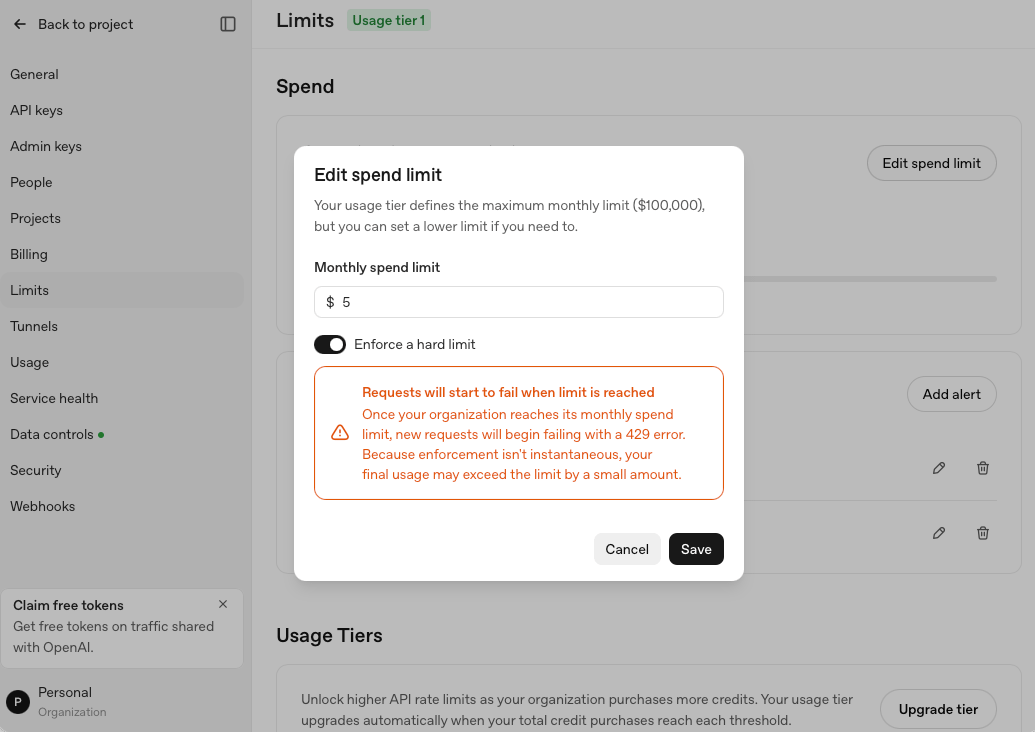
Once you’re logged in, go to Billing and add a small amount of credit, say $5 (this should last you a while for what we’re doing, but if you want to avoid any nasty surprises, make sure to switch off auto-reload and set the monthly spending limit to $5).
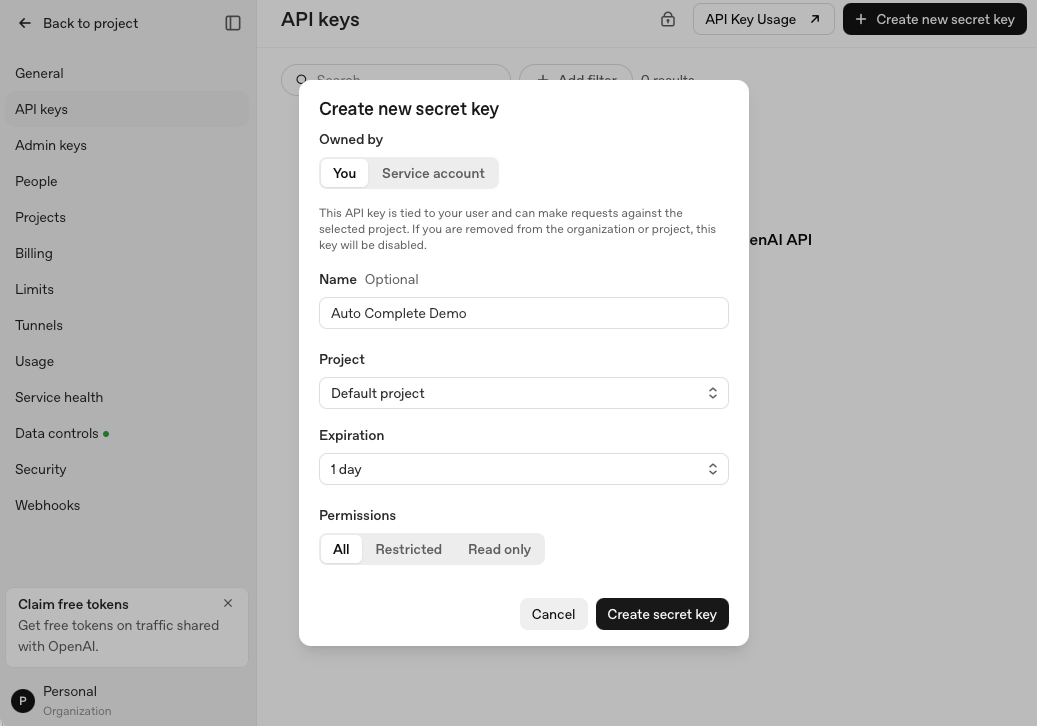
Get an API key to connect your computer to your account
Go to “API keys” and “Create a new secret key”. Give it a name. Set it to expire in 1 day. After you click “Create secret key” copy the key to clipboard (but don’t paste it anywhere yet). Also, note that you won’t be able to see the key again after you close the window (but you can revoke it and create a new one).
Save your API key in your terminal shell
Now open a terminal window and type (typing is better here than cutting and pasting because you don’t want to overwrite the API key stored in your clipboard right now):
read -s OPENAI_API_KEYThis is a shell command that waits for you to type/paste something and stores what you enter as a variable. read reads input from the keyboard and -s tells it to use silent mode which means it won’t display anything. OPENAI_API_KEY is the name we’re giving to the variable where your key will be stored.
So after typing the above into a terminal and hitting enter, paste your API key (you won’t see anything on the screen when you paste it) and hit enter again. This stores the key temporarily (until you close the terminal window) in your shell’s memory.
Input
Now paste this whole block into the terminal and press enter (if you want to understand what it all means first, read ahead and come back):
curl https://api.openai.com/v1/completions \
  -H "Content-Type: application/json" \
  -H "Authorization: Bearer $OPENAI_API_KEY" \
  -d '{
    "model": "babbage-002",
    "prompt": "The first time I looked up at the stars, I knew",
    "max_tokens": 20,
    "temperature": 0.9
  }'
curl is a program that comes with your computer. It sends a web request and prints whatever comes back. In this case, it’s sending the web request to the OpenAI completions endpoint.
On the next line, -H means “header.” A header is a small label attached to the request, separate from the request’s content. The first one says: the data I’m sending is JSON, which is a text format.
The header on the next line carries your credentials. Bearer is just the standard word that goes before a token of this type. It means “whoever bears this token gets access.” It will swap $OPENAI_API_KEY for your actual key before curl runs.
The \ at the end of each line just lets one command span several lines (the terminal treats it all as one instruction).
After -d we have the actual request:
which model to use (in this case
babbage-002but you can also trygpt-3.5-turbo-instruct-0914,gpt-3.5-turbo-instruct, ordavinci-002)the text you want continued (in this case
“The first time I looked up at the stars, I knew”)how many tokens to generate before stopping (in this case 20)
and how much randomness to allow (in this case temperature=0.9)
Output
When I pasted the above block into my terminal, I got the following output:
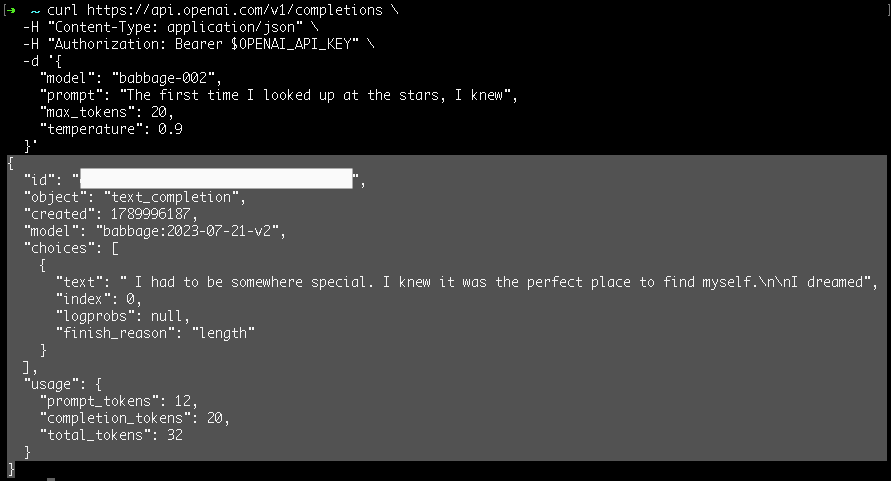
Specifically, the continuation of my input “The first time I looked up at the stars, I knew” was:
I had to be somewhere special. I knew it was the perfect place to find myself.
I dreamed
When I tried a second time, with the temperature turned down to 0.1, I got:
“The first time I looked up at the stars, I knew…”
I was home. I was born in the sky. I was born in the sky. I was
And once more for good measure with temperature = 0.1:
“The first time I looked up at the stars, I knew…”
I was home. I was home in the universe, in the stars, in the sky, in
You can see that when the randomness is low, it kind of says the same stuff.
Let’s try one more time but with max randomness (temperature = 2.0)
“The first time I looked up at the stars, I knew…”
it would have glor Westopol maxima Updated Fior Simpson Let Mayer Emanuel ach humble settlement Friedrich Fo erw
Which is pretty much gibberish.
So it seems like you want a medium level of randomness to get something meaningful.
How useful is this?
I’m guessing that one of the reasons that the frontier labs are phasing this out is because it probably isn’t a very useful way to interact with the models anymore. Even if you’re developing your own agentic harnesses, where you would want to connect to the models directly, the newer higher-level interfaces are likely more useful.
But I find it really rewarding conceptually to play around with the models this way. It gives me a feel for things that are difficult for me to imagine if I hadn’t done it myself.
Of course, you can go much deeper than this and actually fine-tune the models or even train them (assuming access to resources). That’s probably not a direction I’ll be going in any time soon. But if you’d like to read more about this, there are many resources, including the book Build a Large Language Model From Scratch by Sebastian Raschka.
One thing I do want to do here is to explore working with local models, so if you didn’t get a chance to use the OpenAI completion endpoint before the legacy models were deprecated, keep an eye out for the next post where I’ll show how to do the same thing we did here but with a local model.
I’m also working on a course on agentic AI for physics reserach. If you’d like to join the waitlist or give some input into what you’re interested in, you can do that here.
I’m joking. Talking to customers (or in my case clients) to understand their needs is actually very important and you should do it!